- rtshkmr's digital garden/
- Readings/
- Books/
- Fluent Python: Clear, Concise, and Effective Programming – Luciano Ramalho/
- Chapter 3. Dictionaries and Sets/
Chapter 3. Dictionaries and Sets
Table of Contents
What’s New in This Chapter #
Extra: Internals of sets and dicts internalsextra #
This info is found in the fluentpython website. It considers the strengths and limitations of container types (dict, set) and how it’s linked to the use of hash tables.
Running performance tests #
the trial example of needle in haystack has beautiful ways of writing it
1
2
3
4
found = 0 for n in needles: if n in haystack: found += 1when using sets, because it’s directly related to set theory, we can use a one-liner to count the needles that occur in the haystack by doing an intersection:
1found = len(needles & haystack)This intersection approach is the fastest from the test that the textbook runs.
the worst times are if we use the
list datastructurefor the haystackIf your program does any kind of I/O, the lookup time for keys in dicts or sets is negligible, regardless of the dict or set size (as long as it fits in RAM).
Hashes & Equality #
the usual uniform random distribution assumption as the goal to reach for hashing functions, just described in a different way: to be effective as hash table indexes, hash codes should scatter around the index space as much as possible. This means that, ideally, objects that are similar but not equal should have hash codes that differ widely.
- here’s the oficial docs on the hash function
A hashcode for an object usually has less info than the object that the hashcode is for.
- 64-bit CPython hashcodes is a 64-bit number => \(2^{64}\) possible values
- consider an ascii string of 10 characters (and that there are 100 possible values in ascii) => \(100^{10}\) which is bigger than the possible values for the hashcode.
By the way it’s actually salted, there’s some nuances on how the salt is derived but it should be such that each shell has a particular salt.
The modern hash function is the siphash implementation
Hash Implementation #
- each row in the table is traditionally a “bucket”. In the case of sets, it’s just a single item that the bucket will hold
- For 64-bit CPython,
- It’s a 64-bit hash code that points to a 64 bit pointer to the element value
- so the table doesn’t need to keep track of indices, offsets work fine since they are fixed-width.
- Also it keeps 1/3 extra space that gets doubled when encroached so there’s some amortisation happening there also.
Hash Table Algo for sets #
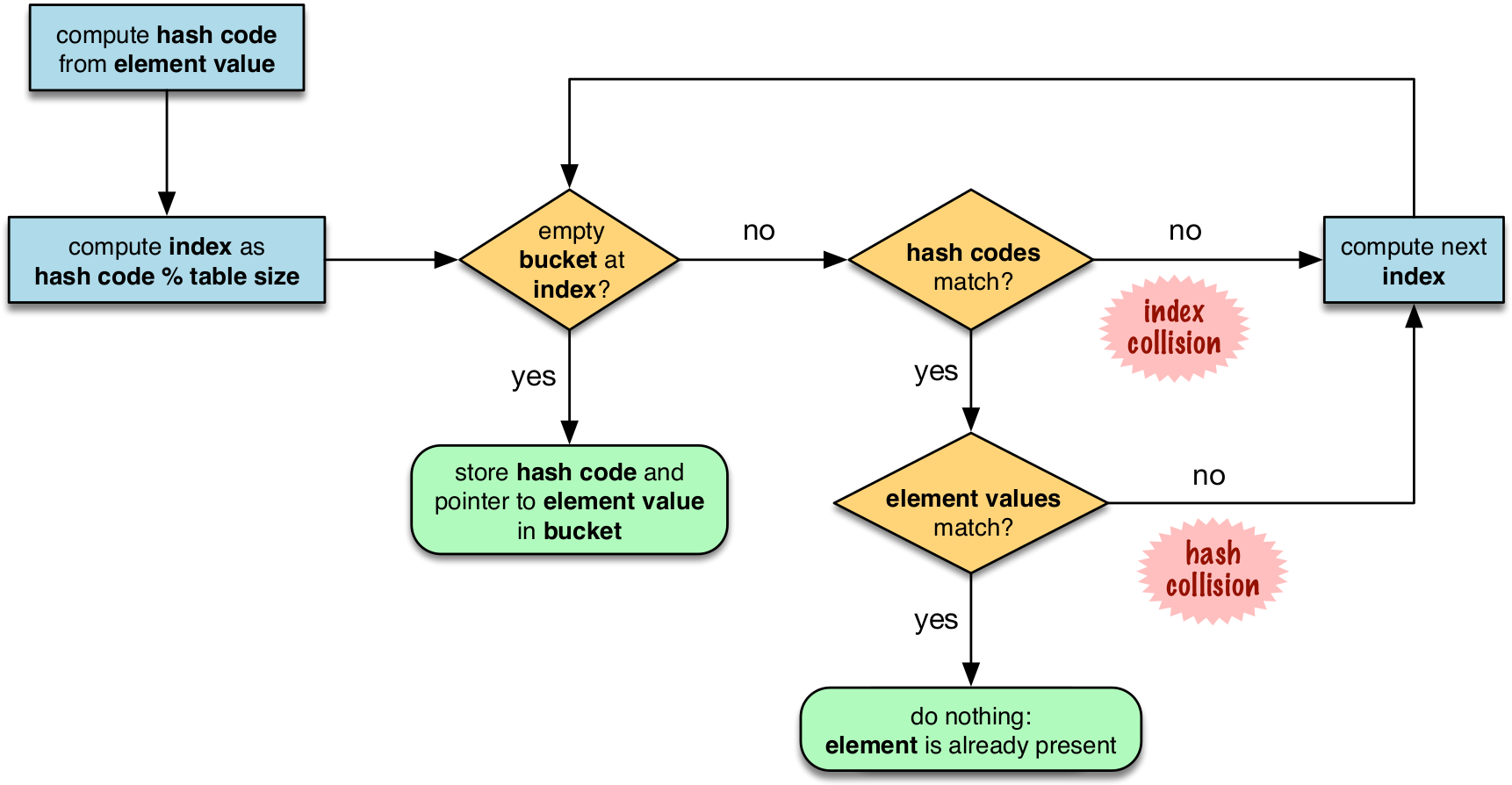
in the flowchart, notice that the first step includes the modulo operation, this is the reason why the insertion order is not preserved since the output of running the modulo on the hashvalues will not be in order, it will spread about.
on hash collisions, the probing can be done in various ways. CPython uses linear probing but also mitigates the harms of using linear probing: Incrementing the index after a collision is called linear probing. This can lead to clusters of occupied buckets, which can degrade the hash table performance, so CPython counts the number of linear probes and after a certain threshold, applies a pseudo random number generator to obtain a different index from other bits of the hash code. This optimization is particularly important in large sets.
the last step is to actually do an equality check on the value. this is why for something to be hashable, two dunder functions must be implemented:
__hash__and__eq__
Hash table usage for dicts #
Dictionary implementation benefits from 2 memory optimisations. Here’s a summary of it:
Here’s a summary of the **two major memory optimizations** for modern Python dictionaries, as described in the referenced Fluent Python article:

1. **Key-Sharing Dictionaries (PEP 412)**
   - Introduced in Python 3.3, this optimization allows multiple dictionaries that share the same set of keys (such as instance `__dict__` for objects of the same class) to share a single "keys table."
   - Only the values are stored separately for each dictionary; the mapping from keys to indices is shared.
   - This greatly reduces memory usage for objects of the same type, especially when many objects have the same attributes[1].

2. **Compact Dictionaries**
   - Modern Python dictionaries use a split-table design, separating the storage of keys and values from the hash table itself.
   - The hash table stores indices into a compact array of keys and values, rather than storing the full key-value pairs directly in the hash table.
   - This reduces memory overhead, improves cache locality, and keeps insertion order predictable and efficient[1].

**In summary:**
- **Key-sharing dictionaries** save memory by sharing the key structure among similar dicts.
- **Compact dicts** store keys and values in separate, dense arrays, minimizing wasted space and improving performance.

[1] https://www.fluentpython.com/extra/internals-of-sets-and-dicts/
[2] https://www.geeksforgeeks.org/python/minimizing-dictionary-memory-usage-in-python/
[3] https://python.plainenglish.io/optimizing-python-dictionaries-a-comprehensive-guide-f9b04063467a
[4] https://stackoverflow.com/questions/10264874/python-reducing-memory-usage-of-dictionary
[5] https://labex.io/tutorials/python-how-to-understand-python-dict-memory-scaling-450842
[6] https://www.youtube.com/watch?v=aJpk5miPaA8
[7] https://www.reddit.com/r/pythontips/comments/149qlts/some_quick_and_useful_python_memory_optimization/
[8] https://www.tutorialspoint.com/How-to-optimize-Python-dictionary-access-code
[9] https://labex.io/tutorials/python-how-to-understand-python-dictionary-sizing-435511
[10] https://www.joeltok.com/posts/2021-06-memory-dataframes-vs-json-like/
[11] https://www.linkedin.com/advice/0/what-strategies-can-you-use-optimize-python-dictionaries-fqcuf
Original implementation #
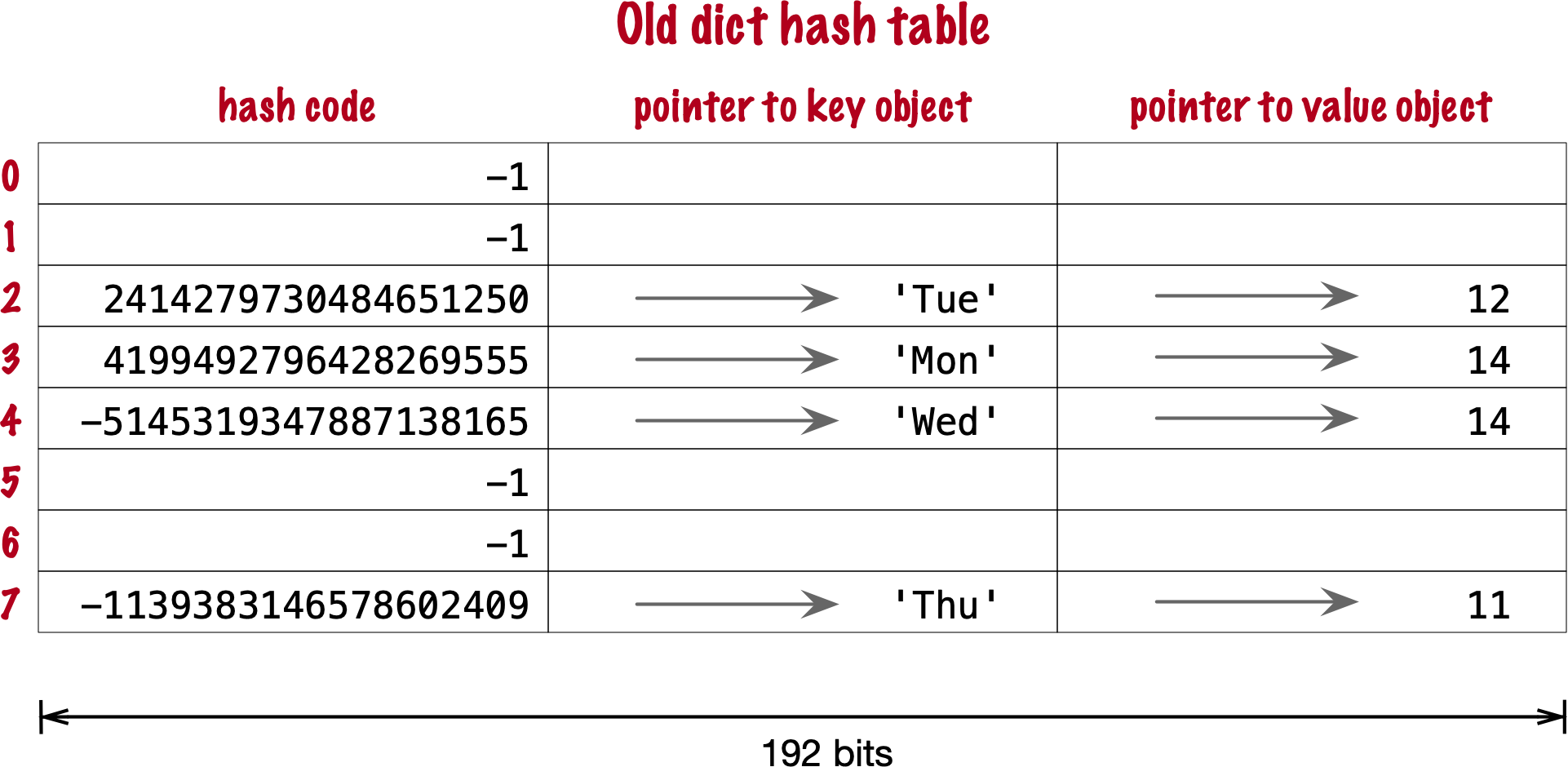
- there’s 3 fields to keep, 64 bits each
- first two fields play the same role as they do in the implementation of sets. To find a key, Python computes the hash code of the key, derives an index from the key, then probes the hash table to find a bucket with a matching hash code and a matching key object. The third field provides the main feature of a dict: mapping a key to an arbitrary value
Optimisation 1: Compact implementation #
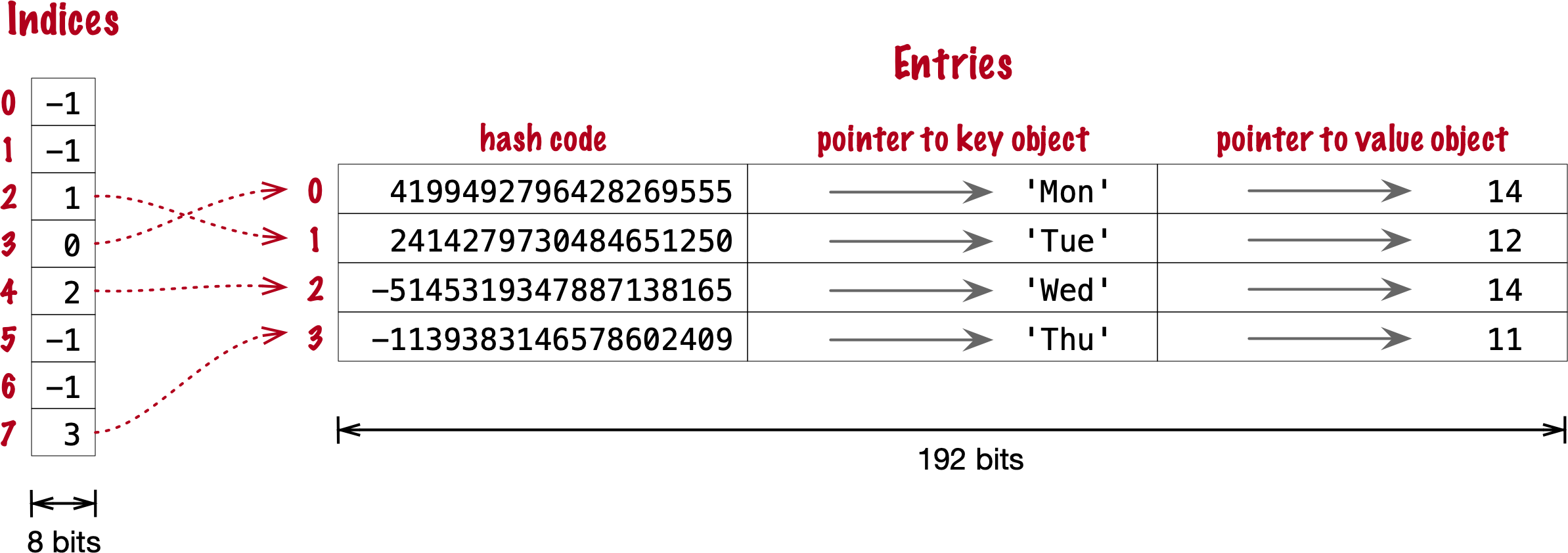
- there’s an indices table extra that has a smaller width (hence compact)
- Raymond Hettinger observed that significant savings could be made if the hash code and pointers to key and value were held in an entries array with no empty rows, and the actual hash table were a sparse array with much smaller buckets holding indexes into the entries array
Optimisation 2: Key-Sharing Dictionary ⭐️ #
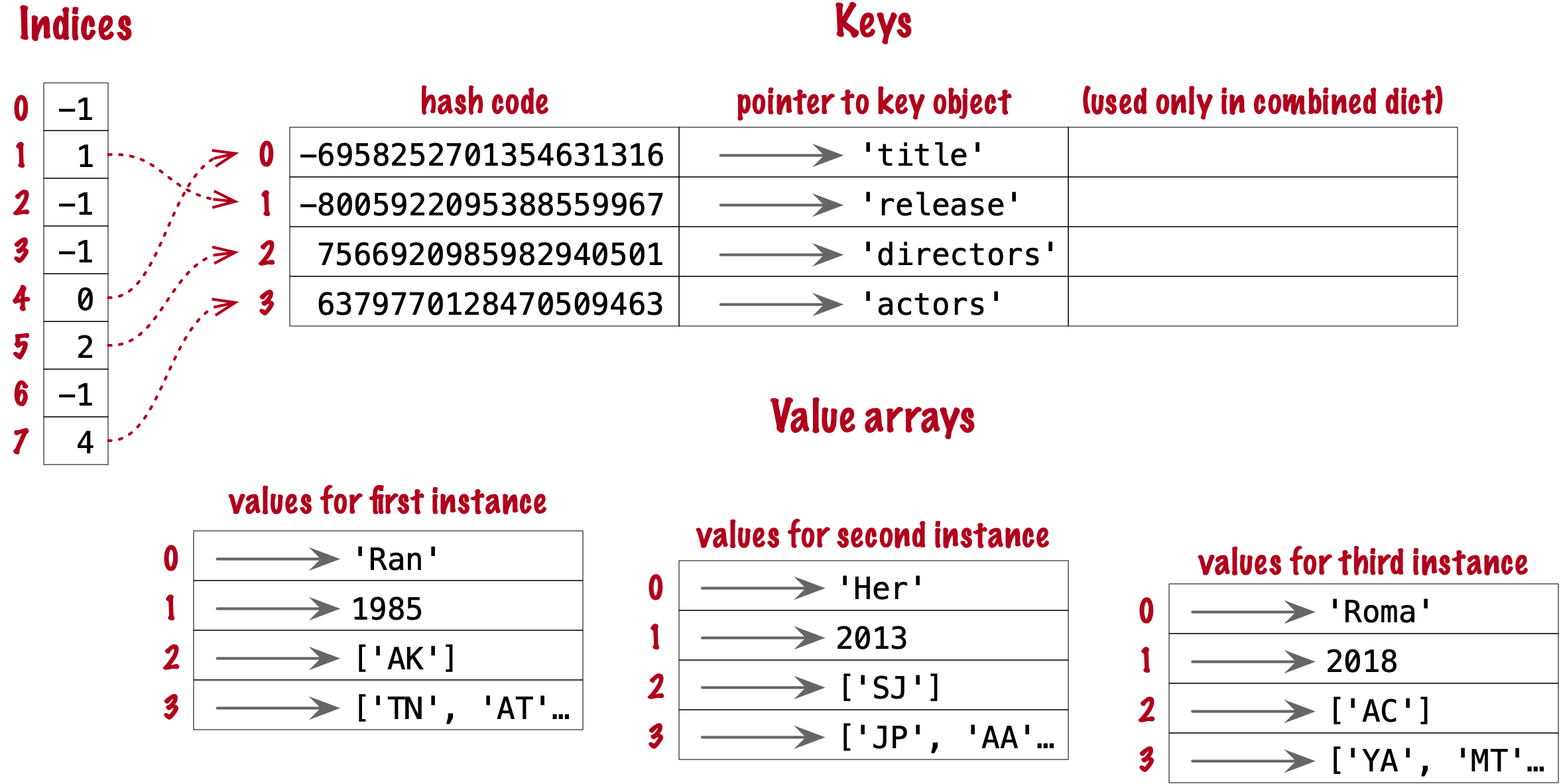
dict(). A split-table dictionary is created to fill the __dict__ special attribute of an instance, when it is the first instance of a class. The keys table is then cached in the class object. This leverages the fact that most Object Oriented Python code assigns all instance attributes in the __init__ method. That first instance (and all instances after it) will hold only its own value array. If an instance gets a new attribute not found in the shared keys table, then this instance’s __dict__ is converted to combined-table form. However, if this instance is the only one in its class, the __dict__ is converted back to split-table, since it is assumed that further instances will have the same set of attributes and key sharing will be useful.
Practical Consequences #
of how sets work #
- need to implement the
__hash__and__eq__functions - efficient membership testing, the possible overheads is the small number of probing the might need to be done to find a matching element or an empty bucket
- Memory overhead:
- an array of pointers is the most compact, sets have significant memory overhead. hash table adds a hash code per entry, and at least ⅓ of empty buckets to minimize collisions
- Insertion order is somewhat preserved but it’s not reliable.
- Adding elements to a set may change the order of other elements. That’s because, as the hash table is filled, Python may need to recreate it to keep at least ⅓ of the buckets empty. When this happens, elements are reinserted and different collisions may occur.
of how dicts work #
- need to implement both the dunder methods
__hash__and__eq__ - key search almost as fast as element searches in sets
- Item ordering preserved in the entries table
- To save memory, avoid creating instance attributes outside of the init method. If all instance attributes are created in init, the dict of your instances will use the split-table layout, sharing the same indices and key entries array stored with the class.
Modern dict Syntax #
dict Comprehensions #
Unpacking Mappings #
- we can use the unpacking operator
**when keys aer all strings - if there’s any duplicates in the keys then the later entries will overwrite the earlier ones
Merging Mappings with | (the union operator) #
- there’s an inplace merge
|=and there’s a normal merge that creates a new mapping| - it’s supposed to look like the union operator and you’re doing an union on two mappings
Syntax & Structure: Pattern Matching with Mappings cool #
this will work with anything that is a subclass or virtual subclass of Mapping
we can use the usual tools for this:
can use partial matching
 1
 2
 3
 4
 5
 6
 7
 8
 9
10
11
data = {"a": 1, "b": 2, "c": 3} match data: case {"a": 1}: print("Matched 'a' only") case {"a": 1, "b": 2}: print("Matched 'a' and 'b'") case _: print("No match") # in this case, the order of the cases matter, the first match is evaluatedcan capture keys using the
**restsyntax1 2 3match data: case {"a": 1, **rest}: print(f"Matched 'a', rest: {rest}")can be arbitrarily deeply nested
1 2 3 4 5 6 7 8 9 10 11 12 13 14 15 16 17 18 19 20 21data = { "user": { "id": 42, "profile": { "name": "Alice", "address": {"city": "Wonderland"} } } } match data: case { "user": { "profile": { "address": {"city": city_name} } } }: print(f"City is {city_name}") case _: print("No match")
Keys in the pattern must be literals (not variables), but values can be any valid pattern, including captures, literals, or even further nested patterns
Pattern matching works with any mapping type (not just dict), as long as it implements the mapping protocol
- Guards (if clauses) can be used to add extra conditions to a match.
More on virtual sub-classes (and how it’s similar to mixins) #
should be used when we can’t control the class (e.g. it’s an external module) but we want to adapt it
allows the indication that a class conforms to the interface of another – to adapt to multiple interfaces
A **virtual subclass** in Python refers to a class that is recognized as a subclass of an abstract base class (ABC) without actually inheriting from it in the traditional sense. This mechanism is provided by the `abc` module and is achieved by *registering* a class as a virtual subclass of an ABC using the `register()` method[4][5][8].

### Core Mental Model

- **Traditional subclassing**: A class (the subclass) inherits from another (the superclass), forming a direct relationship. Methods and attributes are inherited, and `issubclass()` and `isinstance()` reflect this relationship[3].
- **Virtual subclassing**: A class is *declared* to be a subclass of an ABC at runtime, without modifying its inheritance tree or MRO (Method Resolution Order). This is done by calling `ABC.register(SomeClass)`. After registration, `issubclass(SomeClass, ABC)` and `isinstance(instance, ABC)` will return `True`, but `SomeClass` does not actually inherit from `ABC`[4][5][8].

### Why Use Virtual Subclasses?

- **Third-party integration**: If you want to treat classes from external libraries as conforming to your interface (ABC), but you cannot or do not want to modify their source code to inherit from your ABC, you can register them as virtual subclasses[1][8].
- **Interface compliance**: Virtual subclassing is a way to declare that a class “conforms to” an interface, even if it doesn’t inherit from it, as long as it implements the required methods (i.e., it follows the protocol)[2][5].
- **Decoupling**: It allows you to decouple interface definition (the ABC) from implementation, enabling more flexible and extensible designs.

### Example

Suppose you have an ABC and an external class:

```python
from abc import ABC

class Car(ABC):
    def drive(self):
        pass

class Tesla:
    def drive(self):
        print("Driving in Tesla")
```

You want to use `isinstance(obj, Car)` to check if an object can be driven, but `Tesla` does not inherit from `Car`. You can register it:

```python
Car.register(Tesla)

print(issubclass(Tesla, Car))  # True
print(isinstance(Tesla(), Car))  # True
```

Now, `Tesla` is a *virtual subclass* of `Car`, even though it doesn't inherit from it[4][5][8].

### Key Properties

- **No inheritance**: Virtual subclasses do not inherit methods or properties from the ABC. Registration only affects `issubclass()` and `isinstance()` checks[4][8].
- **No MRO change**: The ABC does not appear in the virtual subclass’s MRO, so `super()` calls and method resolution are unaffected[4].
- **Runtime declaration**: Registration can be done at runtime, providing flexibility for dynamic systems[4][5].

### Relationship to Other Python Typing Models

| Model                 | Relationship Mechanism         | Example Use Case                                  |
|-----------------------|-------------------------------|---------------------------------------------------|
| Duck typing           | Implements required interface | Any object with `drive()` method can be used      |
| Virtual subclass      | Registered with ABC           | External class made compatible with ABC interface |
| Classical inheritance | Inherits from superclass      | Subclass extends or customizes base functionality |

Virtual subclassing sits between **duck typing** (no explicit relationship, just interface compliance) and **classical inheritance** (explicit parent-child relationship), allowing you to *declare* interface compliance without direct inheritance[1][6].

### Reference Implementation

The mechanism is built into the `abc.ABCMeta` metaclass, which provides the `register()` method for this purpose[4][5].

> "You can also register unrelated concrete classes (even built-in classes) and unrelated ABCs as 'virtual subclasses' – these and their descendants will be considered subclasses of the registering ABC by the built-in function, but the registering ABC won’t show up in their MRO nor will method implementations defined by the registering ABC be callable..."[4]

### Practical Implications

- **Type checks**: Enables more expressive and flexible type checks in frameworks and libraries.
- **Backward compatibility**: Allows legacy or third-party classes to be integrated into new type hierarchies without code changes.
- **Protocol enforcement**: Encourages protocol-oriented design in a language that is otherwise dynamically typed.

In summary, a **virtual subclass** in Python is a class that, through explicit registration, is treated as a subclass of an abstract base class for type-checking purposes, without requiring direct inheritance or MRO modification[4][5][8]. This is a powerful tool for interface-oriented design and decoupled architectures.

[1] https://stackoverflow.com/questions/51666120/whats-the-usage-of-a-virtual-subclass
[2] https://www.reddit.com/r/learnpython/comments/9fgdib/virtual_subclasses/
[3] https://realpython.com/ref/glossary/subclass/
[4] https://docs.python.org/3/library/abc.html
[5] https://www.demo2s.com/python/python-virtual-subclasses.html
[6] https://stackoverflow.com/questions/51666120/whats-the-usage-of-a-virtual-subclass/51666808
[7] https://en.wikipedia.org/wiki/Virtual_class
[8] https://kavianam.ir/Virtual-Subclass-in-Python
[9] https://stackoverflow.com/questions/57602862/what-is-indirect-and-virtual-subclass
[10] https://hynek.me/articles/python-subclassing-redux/
- a virtual subclass should be seen more like a mixin rather than multiple inheritance
**Virtual subclassing** in Python is *not* the canonical or idiomatic mechanism for achieving "multiple extends" (i.e., multiple inheritance) or adapting to multiple interfaces in the way you might do in statically-typed languages like Java or C#. Instead, Python supports **multiple inheritance** natively and directly through its class definition syntax, and this is the primary mechanism for a class to inherit from multiple parents and thus "implement multiple interfaces"[1][5][6]. ### Multiple Inheritance: The Pythonic Way Python allows a class to inherit from any number of parent classes simply by listing them in the class definition: ```python class MyClass(InterfaceA, InterfaceB, SomeBase): pass ``` This means `MyClass` will inherit all methods and attributes from `InterfaceA`, `InterfaceB`, and `SomeBase`, and will be considered a subclass of each for purposes of `issubclass()` and `isinstance()` checks[1][5][6]. This is the direct and idiomatic way to "extend" multiple interfaces or base classes in Python, and is how you would typically express that a class conforms to multiple protocols or contracts. ### Virtual Subclassing: Purpose and Limitations **Virtual subclassing** via `ABC.register(SomeClass)` is a mechanism for declaring that a class should be *recognized* as a subclass of an abstract base class (ABC) for the purposes of type checking, without actually inheriting from it. This is especially useful when you want to adapt a class (often from a third-party library) to an interface you control, but cannot or do not want to modify its source code[7]. - **Virtual subclassing does not provide code sharing**: The registered class does not inherit any methods or properties from the ABC; it is only recognized as a subclass for `issubclass()` and `isinstance()` checks. - **No method resolution order (MRO) change**: The ABC does not appear in the registered class's MRO, so method resolution and `super()` calls are unaffected. - **No attribute/method adaptation**: If the registered class does not implement the required methods, you get runtime errors. ### Adapting to Multiple Interfaces If you want a class to *adapt* to multiple interfaces: - **If you control the class**: Use multiple inheritance directly. This is idiomatic and gives you both interface conformance and code sharing[1][5][6]. - **If you do not control the class**: Use virtual subclassing to declare interface conformance, but be aware this is only for type checks and does not provide actual method implementations[7]. ### Mixin Pattern A related idiom is the **mixin**: a class designed to be used as a base class that provides additional methods, typically without defining its own state. Mixins are commonly used in Python to modularly add functionality via multiple inheritance, and are a way to "compose" behaviors without the pitfalls of deep inheritance hierarchies[6]. ### Summary Table | Mechanism | Code Sharing | Interface Conformance | Idiomatic Use | |---------------------|-------------|----------------------|----------------------| | Multiple Inheritance| Yes | Yes | Implementing multiple interfaces, mixins | | Virtual Subclassing | No | Yes (type checks) | Adapting foreign classes to your ABCs | **In summary:** Python's primary and idiomatic way to "extend" multiple interfaces is through direct multiple inheritance. **Virtual subclassing** is a supplementary mechanism for adapting existing classes to an interface for type checks, but it does not provide code sharing or actual interface adaptation[1][5][6][7]. [1] https://www.digitalocean.com/community/tutorials/understanding-class-inheritance-in-python-3 [2] https://stackoverflow.com/questions/66849568/issubclass-and-multiple-inheritance [3] https://stackoverflow.com/questions/27545888/is-multiple-inheritance-from-the-same-base-class-via-different-parent-classes-re [4] https://softwareengineering.stackexchange.com/questions/291061/is-there-a-better-pattern-than-multiple-inheritance-here [5] https://dataplatform.cloud.ibm.com/docs/content/wsd/nodes/scripting_guide/clementine/jython/clementine/python_inheritance.html?audience=wdp&context=dph&context=analytics&context=analytics&context=analytics&context=analytics&context=analytics&context=analytics&context=cpdaas [6] https://openstax.org/books/introduction-python-programming/pages/13-5-multiple-inheritance-and-mixin-classes [7] https://hynek.me/articles/python-subclassing-redux/ [8] https://docs.python.org/3/tutorial/classes.html [9] https://realpython.com/inheritance-composition-python/ [10] https://www.geeksforgeeks.org/python/multiple-inheritance-in-python/
Standard API of Mapping Types #
The recommendation is to wrap a dict by composition instead of subclassing the Collection, Mapping, MutableMapping ABCs.
Note that because everything ultimately relies on the hastable, the keys must be hashable (doesn’t matter if the value is hashable)
What Is Hashable #
- ✅ User Defined Types:
for user defined types, the hashcode is the
id()of the object and the__eq__method from theobjectparent class compares the object ids.
gotcha: there’s a salt applied to hashing #
And the salt differs across python processes.
The hash code of an object may be different depending on the version of Python, the machine architecture, and because of a salt added to the hash computation for secu‐ rity reasons.3 The hash code of a correctly implemented object is guaranteed to be constant only within one Python process.
Overview of Common Mapping Methods: using dict, defaultdict and OrderedDict #
:NOTER_PAGE: (115 . 0.580146)
Inserting or Updating Mutable Values: when to use setdefault #
Should use setdefault when you want to mutate the mapping and there’s nothing there
E.g. you wanna fill in empty default values
so instead of doing this which has 2 searches through the dict index ⛔️
| |
we could do just do a single search within the dict index and do:
| |
setdefault returns the value, so it can be updated without requiring a second search.
Automatic Handling of Missing Keys #
We have 2 options here.
defaultdict: Another Take on Missing Keys #
- it’s actually a callable that we are passing as an arg, so when we do things like
boolorlistwe’re actually passing in the constructor to these builtins. - callable is stored within the
default_factoryand we can replace the factory as we wish! - interesting: if we do a membership check on a key that doesn’t exist, the default factory won’t be called yet.
The missing Method #
:PROPERTIES: :NOTER_PAGE: (121 . 0.519175)
TLDR: subclass UserDict instaed of dict to avoid these issues
Take note of the nuances in the implementation that is shown because they avoid infinite recursion.
It’s important to think of how the method delegation may introduce chances of infinite recursion.
Also, same thing for what the fallback methods are for builtin methods.
note: k in my_dict faster than k in my_dict.keys() #
Also technically k in my_dict is faster than using the k in my_dict.keys() because it avoids the attribute lookup to find the .keys method.
Inconsistent Usage of missing in the Standard Library #
TLDR: subclass UserDict instaed of dict to avoid these issues
subclassing builtin types is tricky! (will come up later in the book).
Basically, this dunder method is inconsistently used. Be careful if you wanna subclass this, it may result in infinite recursions.
Variations of dict #
collections.OrderedDict #
Mostly the modern implementation for dict is good enough
- has some minor differences from the modern implementation of
dict:- can handle frequent reordering ops better than
dict=> useful to track recent accesses like in an LRU cache.
- can handle frequent reordering ops better than
- use it for simple implementations of an LRU cache.
collections.ChainMap #
- chains together multiple mappings by holding references to the mappings
- any mods happen to the first-inserted mapping
- it’s useful to search hierarchically (search from d1, then d2, then d3) and prioritises the results found in the earlier implementation.
collections.Counter #
- counters are great!!!
- GOTCHA: when things are tied, only one is returned.
example if counter looks like this:
Counter({'a': 10, 'z': 3, 'b': 2, 'r': 2, 'c': 1, 'd': 1})then if we doct.most_common(3)then even if both b and c are tied, we only get b in the result. Here’s some more context on this:The behavior you’re observing with `Counter.most_common(n)`—where only one of the tied elements is included when there’s a tie at the cutoff—is by design, and it’s important to understand the underlying mechanics and implications. ### Why does this happen? - **`most_common(n)` returns exactly `n` items**: The method returns the *first* `n` elements from the sorted list of items, sorted by count (descending). If multiple elements have the same count at the cutoff position, only those that appear first (according to the internal order, which is typically insertion order for equal counts) are included[1][2][9]. - **Ties are not expanded**: If two or more elements are tied for the last spot in the top `n`, only as many as needed to reach `n` are returned. The method does not automatically include all items with the same count as the nth item[6]. #### Example: ```python from collections import Counter ct = Counter({'a': 10, 'z': 3, 'b': 2, 'r': 2, 'c': 1, 'd': 1}) print(ct.most_common(3)) # Output might be: [('a', 10), ('z', 3), ('b', 2)] ``` Even though both `'b'` and `'r'` have a count of `2`, only `'b'` is included because you asked for the top 3, and `'b'` appears before `'r'` in the internal ordering[2][6]. ### How is the order determined for ties? - **Insertion order**: For elements with equal counts, their order in the result is based on the order they were first encountered in the input (Python 3.7+ dictionaries preserve insertion order)[2][9]. - **No guarantee for all ties**: There is no built-in mechanism to include all elements with the same count as the nth element unless you implement it yourself[6]. ### What if you want all tied elements included? You need to post-process the result. For example, you can: 1. Get the count of the nth item. 2. Iterate through all items and include those with counts >= nth count. ```python from collections import Counter ct = Counter({'a': 10, 'z': 3, 'b': 2, 'r': 2, 'c': 1, 'd': 1}) n = 3 top_n = ct.most_common(n) cutoff = top_n[-1][1] all_tied = [(k, v) for k, v in ct.items() if v >= cutoff] print(all_tied) ``` This will include all items with counts equal to or greater than the nth most common, including ties[6]. ### Summary - `most_common(n)` returns exactly `n` elements, even if there are ties at the last position. - For ties, only the first encountered elements (in insertion order) are included. - To include all tied elements, you must filter manually after getting the cutoff value[2][6][9]. This behavior is documented and is a common source of confusion—your observation is correct and is a subtle but important aspect of using `Counter.most_common()` in Python. [1] https://www.geeksforgeeks.org/python/python-most_common-function/ [2] https://docs.python.org/3/library/collections.html [3] https://www.digitalocean.com/community/tutorials/python-counter-python-collections-counter [4] https://stackoverflow.com/questions/29240807/python-collections-counter-most-common-complexity [5] https://blog.csdn.net/weixin_43056275/article/details/124384145 [6] https://stackoverflow.com/questions/33791057/counter-most-common-is-a-little-misleading/33791292 [7] https://www.youtube.com/watch?v=fqACZvcsNug [8] https://dev.to/atqed/you-can-be-happy-to-know-python-counter-how-to-get-the-most-common-elements-in-a-list-o1m [9] https://ioflood.com/blog/python-counter-quick-reference-guide/ [10] https://dev.to/kathanvakharia/python-collections-module-counter-2gn
shelve.Shelf #
- shelves are for storing pickle jars
- shelves are persistent storage for a mapping of strings to pickle objects
- A Shelf instance is a context manager, so you can use a with block to make sure it is closed after use.
Ref “Pickle’s nine flaws” #
And here’s a bot summary of it:
Here is a summary of the nine flaws of Python's `pickle` module as detailed by Ned Batchelder[1][2]:

1. **Insecure**
   Pickle is fundamentally unsafe for untrusted data. Maliciously crafted pickles can execute arbitrary code during unpickling, as the process can invoke any callable in the Python environment—not just constructors for your objects.

2. **Old pickles look like old code**
   Pickle stores the exact structure of objects as they existed when pickled. If your code changes (e.g., you add or remove attributes), unpickling old data can result in objects that don't match your current codebase, leading to bugs and inconsistencies.

3. **Implicit**
   The serialization process is implicit and automatic: you cannot explicitly control how objects are serialized. For example, you cannot choose to serialize a datetime as an ISO8601 string instead of a datetime object.

4. **Over-serializes**
   Pickle serializes everything in your objects, including data you may not want to persist (like caches or open file handles). There is no straightforward way to exclude unwanted attributes, and if an attribute is not pickle-able, you'll get an exception[2].

5. **`__init__` isn’t called**
   When unpickling, the `__init__` method of your class is not invoked. This can leave objects in an inconsistent state, especially if `__init__` does essential setup or side effects.

6. **Python only**
   Pickle is Python-specific. While there are rare cross-language implementations, they're limited and not practical for general use. This makes pickled data hard to share with non-Python systems.

7. **Unreadable**
   Pickles are binary blobs, not human-readable. You can't inspect or search them with standard tools, making debugging and data recovery more difficult.

8. **Appears to pickle code**
   Pickle will serialize references to functions and classes, but not their code—only their names. This can give the false impression that code is being serialized, but on unpickling, the code must already exist in the environment.

9. **Slow**
   Pickle is slower than many alternative serialization formats, both in terms of speed and efficiency.

> Some of these issues can be mitigated with custom methods like `__getstate__` or `__reduce__`, but at that point, alternative serialization formats (e.g., JSON, protocol buffers) may be more robust and maintainable[1].

These flaws highlight why `pickle` is best reserved for trusted, Python-only, and short-lived data interchange scenarios—not for general-purpose or cross-system serialization.

[1] https://nedbatchelder.com/blog/202006/pickles_nine_flaws.html
[2] https://nedbatchelder.com/blog/tag/python.html
[3] https://www.python4data.science/en/latest/data-processing/serialisation-formats/pickle/index.html
[4] https://pycoders.com/issues/426
[5] https://stanforddaily.com/2019/10/11/face-it-pickles-are-bad-an-irrefutable-proof/
[6] https://content.ces.ncsu.edu/pickle-and-pickle-product-problems
[7] https://diff.blog/post/pickles-nine-flaws-49891/
[8] https://pythonbytes.fm/episodes/show/193/break-out-the-django-testing-toolbox
[9] https://www.reddit.com/r/Python/comments/1c5l9px/big_o_cheat_sheet_the_time_complexities_of/
[10] https://podscripts.co/podcasts/python-bytes/189-what-does-strstrip-do-are-you-sure
Subclassing UserDict Instead of dict #
- key idea here is that it uses composition and keeps an internal dict within the
dataattribute - implementing other functions as we extend it will require us to use the
self.dataattribute.
Immutable Mappings #
we can use a read-only
MappingProxyTypefrom thetypesmodule to expose a readonly proxythe constructor in a concrete Board subclass would fill a private mapping with the pin objects, and expose it to clients of the API via a public .pins attribute implemented as a mappingproxy. That way the clients would not be able to add, remove, or change pins by accident.
Dictionary Views #
- the views are supposed to be proxies as well so they are updated. Any changes to the original mapping will be viewable as well
- because they are not sequences (they are view objects) they are not subscript-able. so doing something like
myvals[0]won’t work. If we wish, we could convert it to a list, but then it’s a copy, it’s no longer a live dynamic read-only proxy.
Practical Consequences of How dict Works #
why we should NOT add instance attrs outside of __init__ functions #
That last tip about instance attributes comes from the fact that Python’s default behavior is to store instance attributes in a special dict attribute, which is a dict attached to each instance.9 Since PEP 412—Key-Sharing Dictionary was implemented in Python 3.3, instances of a class can share a common hash table, stored with the class. That common hash table is shared by the dict of each new instance that has the same attributes names as the first instance of that class when init returns. Each instance dict can then hold only its own attribute values as a simple array of pointers. Adding an instance attribute after init forces Python to create a new hash table just for the dict of that one instance
also KIV the implementation of __slots__ and how that is even better of an optimisation.
Set Theory #
As we had found out from the extension writeup, the intersection operator is a great oneliner found = len(needles & haystack) or found = len(set(needles) & set(haystack)) to be more generalisable (though there’s the overhead from building the set)
Set Literals #
- using the set literal (
{1,2,3}) for construction is faster than using the constructor (set([ 1,2,3 ])) because the constructor will have to do a key lookup to fetch the function - the literal directly uses a
BUILDSETbytecode
Set Comprehensions #
- looks almost the same as dictcomps
Practical Consequences of How Sets Work #
Set Operations #
Set Operations on dict Views #
.keys()and.items()are similar to frozenset.values()may work like this too but only if all the values in the dict are hashable
Even better: the set operators in dictionary views are compatible with set instances.